Skip to content
The Rendering Foundation: DOM Tree and CSSOM
Hi, I'm Terence. Today let's look at one of the foundations of browser rendering: the DOM tree and the CSSOM.
Introduction
In modern web development, it is hard to optimize rendering behavior if you do not understand how the browser parses and paints a page. At the center of that process are the DOM (Document Object Model) tree and the CSSOM (CSS Object Model). This article walks through what they are, how they are built, and how they work together to produce what users finally see on screen.
The DOM Tree
Definition
The DOM tree is the in-memory representation of an HTML document. It turns document structure into a logical tree where each HTML element, attribute, and text fragment becomes a node. The DOM also exposes a programming interface so JavaScript can read and update page structure at runtime.
How the DOM tree is created
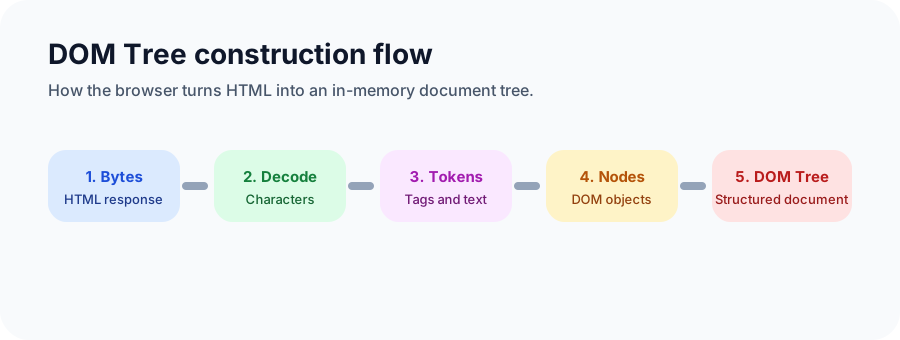
- Byte stream parsing: the browser receives the HTML file as bytes from the server.
- Character decoding: those bytes are decoded into characters.
- Tokenization: characters are turned into tokens such as start tags, end tags, and text.
- Node creation: tokens are converted into DOM nodes.
- Tree construction: nodes are connected into the final DOM tree.
For example, the following HTML:
html
<html>
  <head>
    <title>Example Page</title>
  </head>
  <body>
    <h1>Welcome</h1>
    <p>This is a paragraph.</p>
  </body>
</html>
becomes a structure like this:
plain
Document
└── html
    ├── head
    │   └── title
    │       └── #text: Example Page
    └── body
        ├── h1
        │   └── #text: Welcome
        └── p
            └── #text: This is a paragraph.
Internal structure of a DOM node
A DOM node normally carries the following data:
nodeTypefor the node kind, such as element, text, or commentnodeNamefor the node namenodeValuefor the node valueparentNodefor the parent referencechildNodesfor the child collectionattributesfor the attribute list on element nodes
Performance considerations
Frequent DOM mutations can hurt performance because changes may trigger reflow or repaint. Common mitigation strategies include:
- batching updates with
DocumentFragment - modifying nodes off-screen before reinserting them
- using virtual DOM strategies, such as the ones used by React and Vue
The CSSOM
What the CSSOM is
The CSSOM is the object representation of CSS. It converts stylesheet rules into a structure the browser can analyze and apply. The CSSOM is built in parallel with the DOM tree, and both are later combined to form the render tree.
How the CSSOM is built
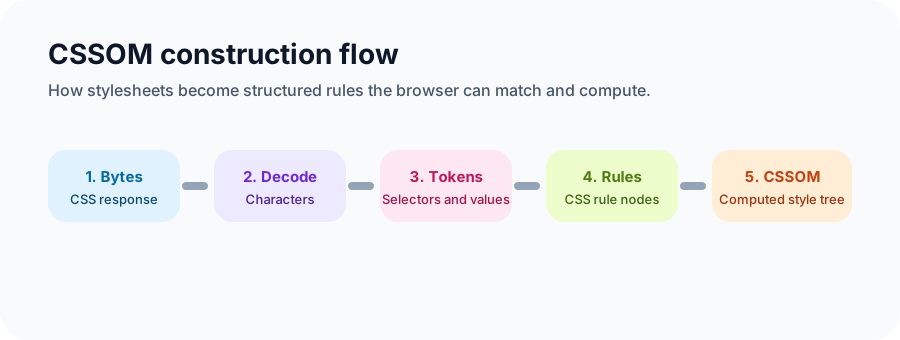
- Byte stream parsing: CSS is received as a byte stream.
- Character decoding: bytes become characters.
- Tokenization: selectors, properties, and values are tokenized.
- Node creation: tokens are converted into CSSOM nodes.
- Tree construction: rules are connected and computed into a CSSOM tree.
For example:
css
body { font-size: 16px; }
h1 { color: blue; }
p { margin: 10px; }
can be understood as a structure like this:
plain
CSSOM
└── body
    ├── font-size: 16px
    ├── h1
    │   └── color: blue
    └── p
        └── margin: 10px
Why the CSSOM matters to performance
CSSOM construction is render-blocking. The browser usually waits for styles to be understood before it paints the page. Practical optimizations include:
- removing unused CSS
- loading non-critical CSS asynchronously with media queries or split delivery
- inlining critical CSS for the first viewport
The relationship between the DOM tree and the CSSOM
Built in parallel
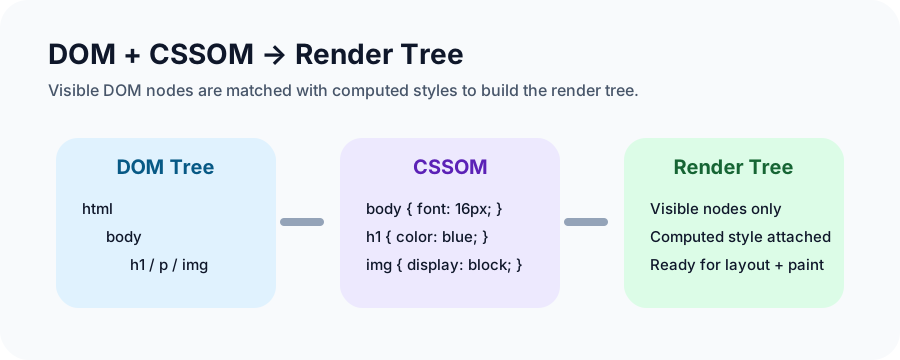
The DOM tree and the CSSOM are built in parallel, but the final rendering result depends on both.
How the render tree is formed
The render tree is produced by combining the DOM tree and the CSSOM:
- Traverse visible nodes in the DOM tree.
- Match each visible node with its computed style rules from the CSSOM.
- Produce a render tree that contains both content and visual styling.
How JavaScript affects both
JavaScript can update both the DOM and the CSSOM dynamically. That power is useful, but it can also introduce extra reflow and repaint work. Modern frameworks reduce unnecessary updates through batching, scheduling, and virtual DOM style abstractions.
Closing
Understanding the DOM tree and CSSOM makes it easier to reason about rendering cost, layout issues, and visual performance. Even if most daily feature work does not require digging into these internals, the moment you hit a stubborn rendering bug, this model becomes very practical.
If you have a different perspective or a case you want to unpack, feel free to discuss it with me.