Skip to content 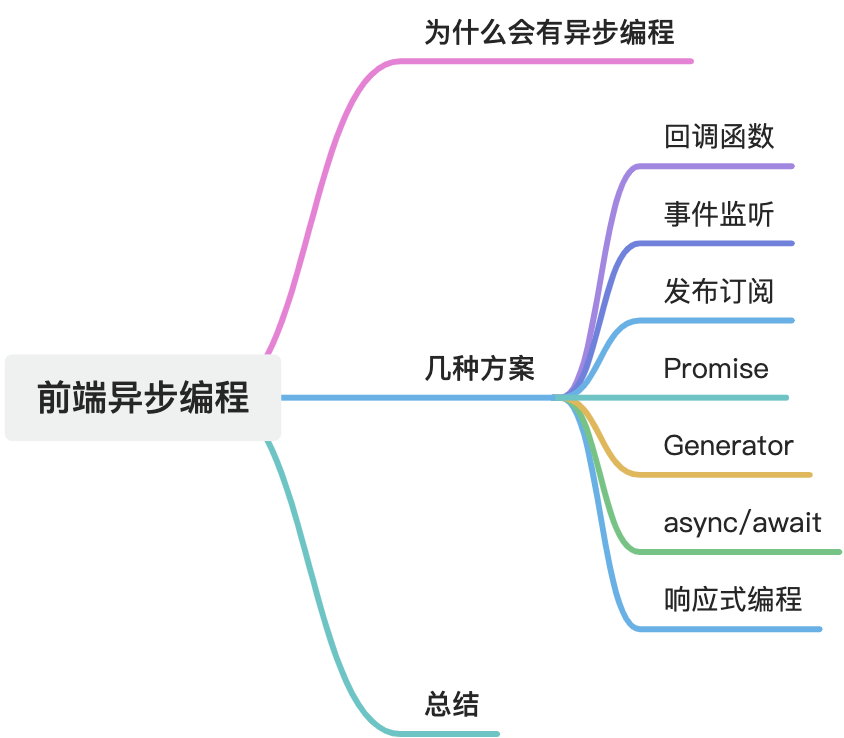
Asynchronous Programming Patterns in Frontend Development
Why asynchronous programming exists
JavaScript is traditionally described as a single-threaded language. In simple terms, that means it can only execute one task at a time. If there are multiple tasks, they have to line up and run one after another.
That becomes a problem when one of those tasks is time-consuming, such as reading a file, making a network request, or waiting for user input. If the program blocks while waiting, the rest of the application cannot continue smoothly. In the browser, that can freeze the UI and make the page feel slow or unresponsive.
Asynchronous programming was introduced to solve that problem. It allows a program to start an operation, continue doing other work, and then handle the result later when the operation finishes.
Main motivations include:
- Avoid blocking: long-running work should not stop the rest of the program from responding.
- Improve performance: multiple time-consuming operations can overlap instead of waiting one by one.
- Better user experience: frontend interfaces stay responsive during network calls and other async work.
- Concurrency: on the server side and in more complex environments, async patterns improve throughput and scalability.
Common asynchronous solutions
Callback
Callbacks were once the main way to implement asynchronous logic in JavaScript.
Example
javascript
function doStep1(init, callback) {
  const result = init + 1;
  callback(result);
}
function doStep2(init, callback) {
  const result = init + 2;
  callback(result);
}
function doStep3(init, callback) {
  const result = init + 3;
  callback(result);
}
function doOperation() {
  doStep1(0, (result1) => {
    doStep2(result1, (result2) => {
      doStep3(result2, (result3) => {
        console.log(`Result: ${result3}`);
      });
    });
  });
}
doOperation();
Pros and cons
Pros: simple and easy to understand as a traditional pattern.
Cons: easily leads to callback hell, deep nesting, weaker readability, and harder error handling.
Event listener
This pattern depends on an event occurring. Once the event happens, the corresponding handler runs.
Example
javascript
element.addEventListener("click", function () {
  alert("Hello World!");
});
Pros and cons
Pros: multiple handlers can listen to the same event, and event-driven structure can help decouple modules.
Cons: once everything becomes event-driven, execution flow can become hard to follow.
Publish-subscribe
The publish-subscribe pattern is common in frontend systems for decoupling components and handling events asynchronously.
Example
javascript
// pub/sub manager
const pubSub = {
  events: {},
  subscribe(event, callback) {
    if (!this.events[event]) {
      this.events[event] = [];
    }
    this.events[event].push(callback);
  },
  publish(event, data) {
    if (!this.events[event]) return;
    this.events[event].forEach((callback) => callback(data));
  },
};
javascript
// button component
<button id="btn">Click me</button>;

const button = document.getElementById("btn");

button.addEventListener("click", () => {
  pubSub.publish("buttonClicked", "The button was clicked!");
});
javascript
// message component
<div id="message"></div>;

const messageElement = document.getElementById("message");

pubSub.subscribe("buttonClicked", (message) => {
  messageElement.textContent = message;
});
Pros and cons
Pros
- Decouples components from each other
- Easy to extend
- Works well for asynchronous event handling
- Provides a central event hub
Cons
- Poor unsubscribe discipline can create memory leaks
- Event chains can become difficult to reason about
- It adds unnecessary complexity in small applications
- Debugging event flow can be difficult
Promise
Promise is the foundation of modern asynchronous programming in JavaScript. It is an object returned by an asynchronous operation that tells us the current state of that operation.
Example
javascript
const fetchPromise = fetch(
  "https://mdn.github.io/learning-area/javascript/apis/fetching-data/can-store/products.json"
);

console.log(fetchPromise);

fetchPromise.then((response) => {
  console.log(`Response received: ${response.status}`);
});

console.log("Request sent...");
Pros and cons
Pros: once settled, the state does not change; the async flow becomes more structured and easier to chain.
Cons: .then() and .catch() chains can still become awkward in more complex flows.
Generator
ES6 introduced generator functions. With yield, they can pause execution and resume later, which made them a possible building block for asynchronous control flow.
Example
javascript
function* foo(index) {
  while (index < 2) {
    yield index;
    index++;
  }
}

const iterator = foo(0);

console.log(iterator.next().value);
// Expected output: 0

console.log(iterator.next().value);
// Expected output: 1
Pros and cons
Pros: can pause and resume execution and can model complex flows when combined with Promises.
Cons: the syntax is less intuitive and is used less often in day-to-day frontend work now.
async / await
async and await are part of ECMAScript 2017. They are syntactic sugar built on top of Promises and make asynchronous code read more like synchronous code.
Example
javascript
function resolveAfter2Seconds() {
  return new Promise((resolve) => {
    setTimeout(() => {
      resolve("resolved");
    }, 2000);
  });
}

async function asyncCall() {
  console.log("calling");
  const result = await resolveAfter2Seconds();
  console.log(result);
  // Expected output: "resolved"
}

asyncCall();
Pros and cons
Pros: cleaner syntax and better readability.
Cons: requires environments that support modern JavaScript, or else transpilation for older browsers.
Reactive programming
Reactive programming is based on events and streams. In the async models above, one way to get a result is to actively poll. Another way is to react passively when new data arrives. In the reactive style, the result of one task is modeled as an event or stream, and that event drives the next step.
Example
Using RxJS:
javascript
<button id="btn">Click me</button>
<p id="result"></p>
javascript
import { fromEvent } from "rxjs";

const button = document.getElementById("btn");
const resultElement = document.getElementById("result");

const clickObservable = fromEvent(button, "click");

clickObservable.subscribe(() => {
  resultElement.textContent = "The button was clicked!";
});
Pros and cons
Pros: excellent for event streams, async data flow, and real-time scenarios.
Cons: a steeper learning curve and often too heavy for simple applications.
Summary
For simple asynchronous work, Promise and async/await are usually the most common and practical choices. For more complex event streams and reactive data flow, RxJS offers stronger abstractions and tooling. Generator functions still have value in certain scenarios, but they are less common in modern frontend practice. Callbacks are used much less than before and are often replaced by newer patterns.
When choosing an async solution, the right answer depends on project requirements, team familiarity, and system complexity.