Skip to content 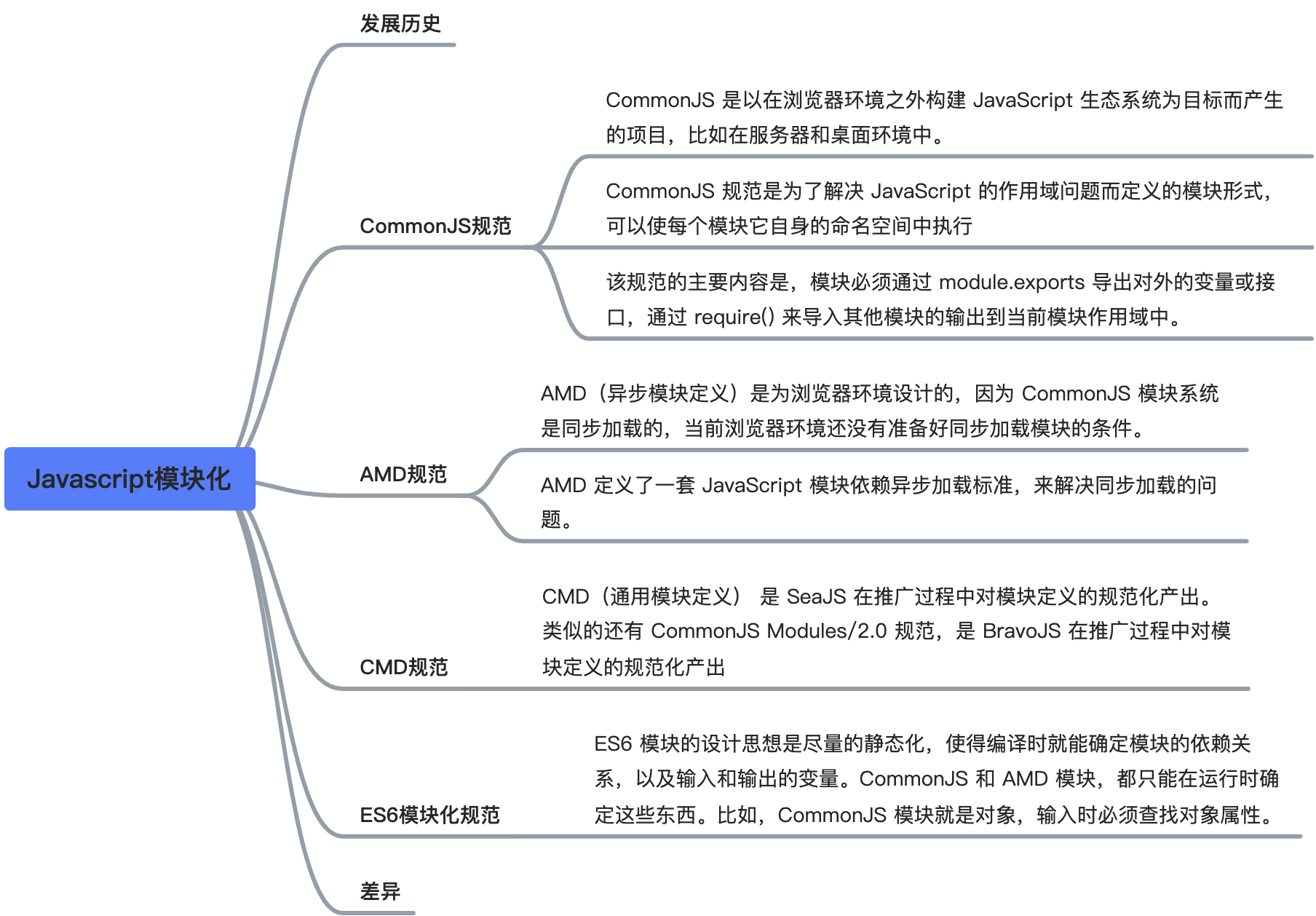
JavaScript Module Systems
Evolution of JavaScript modules
No module system -> CommonJS -> AMD -> CMD -> ES6 Modules
CommonJS
Overview
The CommonJS specification was introduced to address scope and modularity problems in JavaScript. It lets each module execute inside its own namespace. In practice, every file is treated as its own module and has its own scope. Variables, functions, and classes declared in one file are private to that file unless they are explicitly exported.
On the server side, CommonJS modules are loaded synchronously at runtime. In the browser, they usually need to be bundled ahead of time.
Features
- All code runs inside module scope and does not pollute the global scope.
- A module can be loaded multiple times, but it only executes the first time. Later loads reuse the cached result.
- Modules are loaded in the order they appear in code.
Basic syntax
javascript
// export
module.exports = value;
exports.xxx = value;

// import
require(xxx);
Notes
- The main job of
requireis to load and execute a JavaScript file, then return that module'sexportsobject. - If the requested module cannot be found, it throws an error.
- CommonJS exports a copy of a value. Once a value has been exported, later internal changes to that value are not reflected automatically in consumers. This is an important difference from ES modules.
AMD
Overview
AMD stands for Asynchronous Module Definition. Its core idea is asynchronous module loading, so loading a module does not block the statements that follow it. Code that depends on a module is placed inside a callback and runs after the module finishes loading.
Features
- Module definitions are explicit and clear.
- It does not pollute the global environment.
- Dependency relationships are easy to see.
- It works well in browser environments and supports asynchronous and dynamic loading.
Basic syntax
- Export:
javascript
// module without dependencies
define(function () {
  return "";
});

// module with dependencies
define(["module1", "module2"], function (m1, m2) {
  // do something with m1 and m2
});- Import:
javascript
require(["module1", "module2"], function (m1, m2) {
  // do something with m1 and m2
});
CMD
Overview
CMD is a module specification designed mainly for browsers. Module loading is asynchronous, and a module is typically loaded when it is actually used. CMD combines ideas from both CommonJS and AMD. In Sea.js, JavaScript modules generally follow the CMD style.
Basic syntax
- Export:
javascript
// module without dependencies
define(function (require, exports, module) {
  exports.xxx = value;
  module.exports = value;
});

// module with dependencies
define(function (require, exports, module) {
  var module2 = require("./module2");
  require.async("./module3", function (m3) {});
  exports.xxx = value;
});- Import:
javascript
define(function (require) {
  var m1 = require("./module1");
  var m4 = require("./module4");
  m1.show();
  m4.show();
});
ES6 modules
Overview
ES6 introduced modules at the language level and did so in a much more standardized way. The goal was to provide a common module solution for both browsers and servers.
The design of ES modules is intentionally static. The dependency graph, as well as imported and exported bindings, can be determined at compile time.
Basic syntax
export style
- Export:
javascript
let basicNum = 0;
let add = function (a, b) {
  return a + b;
};
export { basicNum, add };- Import:
javascript
import { basicNum, add } from "./math";

function test(ele) {
  ele.textContent = add(99 + basicNum);
}
export default style
- Export:
javascript
// export-default.js
export default function () {
  console.log("foo");
}
The default export of export-default.js is a function. Other modules can import it using any name they want.
- Import:
javascript
// import-default.js
import customName from "./export-default";
customName(); // foo
With a default export, you do not use curly braces when importing.
export vs export default
exportandimportcan appear multiple times, butexport defaultcan only appear once in a module.- Named exports must be imported with
{}. - Default exports are imported without
{}. exportcan directly export variables and bindings by name.
Differences between ES modules and CommonJS
Anything with an s, such as exports and module.exports, belongs to CommonJS. The singular forms export and export default belong to ES modules.
CommonJS exports a copy of a value, ES modules export a live binding
- CommonJS exports a copied value. Once exported, later internal changes do not automatically update the consumer.
- ES modules work differently. During static analysis, the engine sees an
importand creates a binding to the exported value. When the code runs, the imported name points back to the original binding in the source module. - That is why changes to an exported binding can be observed by the importing module.
- This live-binding behavior is also one reason hot updates can work more naturally in modern tooling.
CommonJS loads at runtime, ES modules expose interfaces at compile time
- Runtime loading
- A CommonJS module behaves like an object. When you import it, the system loads the whole module, creates an object, and then reads properties from that object.
- Compile-time loading
- ES modules are not exposed as a plain runtime object in the same way. Their exported interfaces are declared statically with
export, andimportuses static syntax to consume them.
- ES modules are not exposed as a plain runtime object in the same way. Their exported interfaces are declared statically with
In short:
- CommonJS loads
module.exportsafter the module has executed. - ES modules expose a statically known interface before runtime execution of imports completes.
That difference is fundamental to modern bundling, tree-shaking, and static analysis.