Skip to content 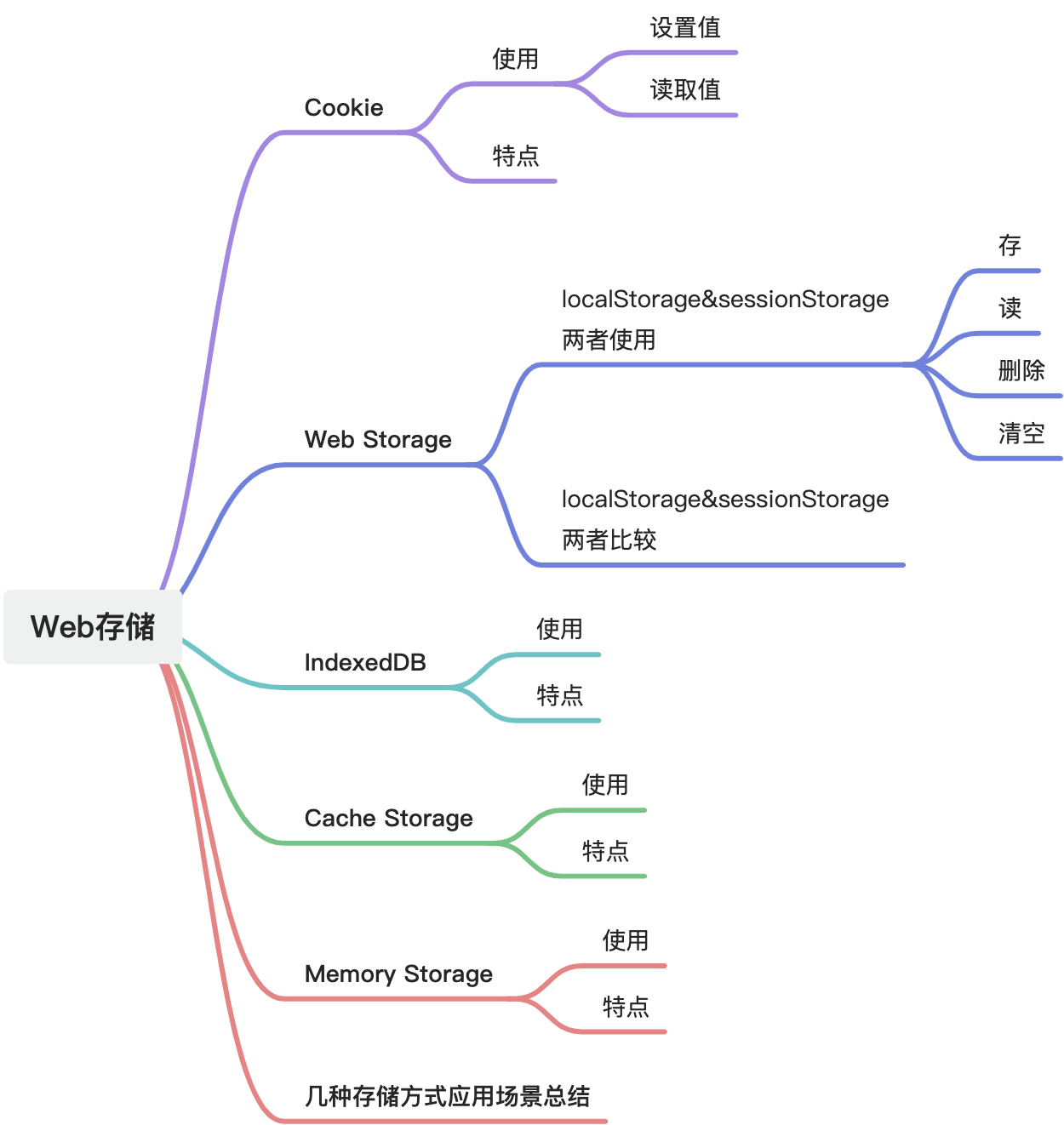
Storage Options in Web Applications
Cookie
Cookies are small text files stored in the browser. They are used to pass data between the client and the server, and they are a common mechanism for tracking session data, preferences, and user state.
Usage
Set values
javascript
document.cookie = "name=oeschger";
document.cookie = "favorite_food=tripe";
alert(document.cookie);
// shows: name=oeschger;favorite_food=tripe
Read values
javascript
document.cookie = "test1=Hello";
document.cookie = "test2=World";

const myCookie = document.cookie.replace(
  /(?:(?:^|.*;\s*)test2\s*\=\s*([^;]*).*$)|^.*$/,
  "$1"
);

alert(myCookie);
// shows: World
Features
- Small capacity: a cookie is usually limited to only a few KB, often around 4 KB.
- Domain scope: a cookie belongs to a specific domain and can only be read or modified under that domain.
- Path scope: a cookie can be limited to specific paths on a site.
- Security caveats: cookies can be read and modified by the browser, so sensitive data should not be stored casually.
- Expiration: cookies can expire at the end of a session or at a later time.
- Server transmission: browsers automatically attach cookies to matching HTTP requests.
- Persistence: many cookies survive across visits and can be reused later.
- State compensation for HTTP: cookies help identify users across otherwise stateless HTTP requests.
Web Storage
Web Storage includes localStorage and sessionStorage.
Usage
javascript
// save data to localStorage
localStorage.setItem("key", "value");

// read data from localStorage
let data = localStorage.getItem("key");

// remove one item
localStorage.removeItem("key");

// clear everything
localStorage.clear();
sessionStorage is used in the same way.
localStorage vs sessionStorage
- Lifetime
localStorage: persists until the user clears it or the site removes it.sessionStorage: only lasts for the current tab session.
- Scope
localStorage: shared across pages under the same origin.sessionStorage: limited to the current tab session.
- Storage limits
- both are often in the 5 MB to 10 MB range depending on the browser
- Sharing and isolation
localStorage: shared across same-origin pagessessionStorage: isolated per tab
Use localStorage when data should survive longer and be shared across pages. Use sessionStorage when data only needs to live during the current session.
IndexedDB
IndexedDB is a lower-level browser API for storing large amounts of structured data, including files and binary large objects. It uses indexes for efficient querying.
Usage
javascript
const request = indexedDB.open("myDatabase", 1);

request.onupgradeneeded = (event) => {
  const db = event.target.result;

  const usersStore = db.createObjectStore("users", {
    keyPath: "id",
    autoIncrement: true,
  });

  usersStore.createIndex("name", "name", { unique: false });
  usersStore.createIndex("email", "email", { unique: true });
};

request.onsuccess = (event) => {
  const db = event.target.result;

  const transaction = db.transaction("users", "readwrite");
  const usersStore = transaction.objectStore("users");

  usersStore.add({ name: "John Doe", email: "john@example.com" });
  usersStore.add({ name: "Alice Smith", email: "alice@example.com" });

  const emailIndex = usersStore.index("email");
  const request = emailIndex.get("john@example.com");
  request.onsuccess = (event) => {
    const user = event.target.result;
    if (user) {
      console.log(user);
    } else {
      console.log("User not found.");
    }
  };
};

request.onerror = (event) => {
  console.error("Error opening database:", event.target.error);
};
This is only a simple example. IndexedDB supports more complex queries, ranges, indexes, and transaction patterns.
Features
- Large capacity: often far larger than
localStorage - Asynchronous API: avoids blocking the main thread
- Transaction support: helps keep operations consistent
- Complex querying: supports indexes, cursors, and range queries
- Multiple object stores: similar to tables in a database
- Cross-tab support: same-origin pages can share it
- Local-only data: data stays on the user's device unless your app explicitly syncs it
Cache Storage
Cache Storage is a browser API for caching resource files. It is especially important in PWAs because it allows HTML, CSS, JavaScript, images, and other assets to be cached locally for offline usage and faster repeat loads.
Usage
javascript
self.addEventListener("install", (event) => {
  event.waitUntil(
    caches.open("my-cache").then((cache) => {
      return cache.addAll([
        "/",
        "/index.html",
        "/styles.css",
        "/script.js",
        "/images/logo.png",
      ]);
    })
  );
});

self.addEventListener("fetch", (event) => {
  event.respondWith(
    caches.match(event.request).then((response) => {
      if (response) {
        return response;
      }
      return fetch(event.request).then((response) => {
        const clonedResponse = response.clone();
        caches.open("my-cache").then((cache) => {
          cache.put(event.request, clonedResponse);
        });
        return response;
      });
    })
  );
});
This is a simple Service Worker example. Cache Storage is usually used together with Service Workers for offline support and request interception.
Features
- Offline access: cached resources remain available even without a network connection
- Fast loading: resources can be served from cache instead of the server
- Layered caching: developers can separate resources into different caches
- Flexible cache strategies: stale-while-revalidate, network-first, cache-first, and more
- Network interception: Service Workers can choose whether to serve from cache or network
- Cross-session persistence: cache data can survive browser restarts
- Resource management: assets can be added, updated, and removed as needed
Memory Storage
Memory storage means keeping data only in runtime memory. It is often used for simple state management, especially in small applications or component-level state sharing.
Usage
Typical examples include Vue's data or React's useState. These are memory-based state containers and are everywhere in day-to-day frontend development.
Features
- Temporary storage: data is lost on refresh or close
- In-memory only: fast reads and writes with no network cost
- Same lifecycle as the page: data disappears when the page goes away
- Lightweight: does not consume persistent disk storage the way local databases do
- No cross-tab sharing by default: each tab has its own memory space
- Good for simple state: practical for lightweight state sharing, but not enough for larger application state needs
Scenario summary
- Cookie: good for small identity, session, and preference data shared with the server
- localStorage: useful for small key-value data such as user settings and preferences
- sessionStorage: useful for temporary state that only needs to last for the current session
- IndexedDB: good for large structured data, offline access, and complex querying
- Cache Storage: ideal for PWA resource caching and offline support
- Memory Storage: good for temporary state in small apps or components
In practice, frontend applications often combine multiple storage strategies. The right choice depends on capacity, persistence, sharing needs, and the complexity of the application.